Triaging high-value group bookings means sorting incoming enquiries so the most valuable ones, the large parties, venue hires, corporate and occasion bookings, surface above routine messages instead of waiting in arrival order. The method has three parts. Define high value by clear signals: party size above a set threshold, occasion, venue hire, corporate or third-party sender, repeat or VIP guest. Build a priority view in your inbox using flags and categories in Outlook or labels and filters in Gmail, with rules that auto-flag the obvious signals. Then run a sweep routine with a named owner for the high-value queue. This works at low volume. It breaks at high volume and out of hours, which is exactly when the high-value enquiries arrive. That is the problem behind a line we hear from reservations leads constantly: "when you've got a lot of enquiries coming in, the big ones can get lost."
What counts as a high-value booking enquiry
You cannot triage what you have not defined. So before any inbox setup, the team needs a shared, written answer to one question: what makes an enquiry worth pulling to the front of the queue?
The signals are scannable, and a good reservations lead already reads them by eye:
Party size above a threshold. Most groups set one, often around eight covers, where an enquiry stops being a normal table and starts being a group booking that needs handling.
Occasion. Christmas, a corporate event, a birthday, a wedding, a wake. The occasion usually signals both spend and the cost of getting it wrong.
A venue hire or exclusive-use request. The largest single bookings a group takes, and the ones a competitor will happily win instead.
A corporate or agency sender domain. Often a repeat buyer, often booking on behalf of others, often worth more than one event.
A third-party platform source. Enquiries from the booking platforms tend to carry larger parties than a walk-up web form.
A repeat or VIP guest. Known value, and a relationship worth protecting.
One trap to avoid: treating value as party size alone. Value is closer to covers multiplied by spend multiplied by the cost of losing the booking. A 200-cover venue hire and a 12-cover tasting-menu booking can both belong at the top of the queue, which is why a simple sort by headcount misses the point. As one Head of Reservations put it, the goal is to keep the team "focused on group bookings of 20s and 30s, not a booking of two people."
The useful thing about all of these signals is that they are visible in the text of the enquiry. That is what makes triage possible at all, by a person or by a system.
How to triage high-value bookings in a shared inbox today
You do not need new software to triage better. A team on a shared Gmail or Outlook inbox can put a workable method in place this week. Five steps.
Agree the threshold and write it down. Decide the covers threshold and the signals from above, and put them somewhere the whole team can see, so everyone triages the same way rather than to their own judgment. Triage that means something different to each person is not triage.
Build a priority view. Give high-value enquiries somewhere to collect. In Outlook, a flag plus a colour category. In Gmail, a star plus a label and a filter. The point is one place the owner can open and see every live high-value enquiry, separate from the general queue. The mechanics are the same ones you would use to route by location in Gmail or in Outlook.
Auto-flag the obvious signals. Some signals are predictable enough to catch with a rule rather than an eye. Set a filter or rule that flags enquiries from your third-party platform senders and from corporate domains automatically. A flag is only as good as the person who remembers to apply it, so automate the part you can.
Sweep the untriaged mail twice a shift. First thing and mid-shift, someone scans what has come in and has not been flagged, and pulls the high-value ones into the priority view. This catches the judgment cases a rule cannot: the free-text wedding enquiry, the vague "do you do big groups" message.
Give the high-value queue a named owner. Not whoever is free. The person who nurtures big bookings owns the priority view and works it first. High-value enquiries reward attention, and attention needs an owner.
Done properly, this method genuinely helps. For a handful of sites and a calm inbox, it can be most of what you need.
The triage routine that keeps the big ones visible
The setup is half the job. The routine is what keeps it working once the week gets busy.
The teams who triage well run on a few habits. A written threshold everyone applies the same way, so the priority view means the same thing on Monday and Friday. A named owner for the high-value queue, so nothing depends on "someone" catching it. A sweep cadence the team actually keeps, at open, mid-shift, and end of day. And an escalation rule for the genuinely large ones: a venue hire or a 200-cover event does not go into a queue at all, it goes straight to a named person the moment it lands.
These are sensible habits and worth adopting. They also share one quiet dependency. They hold while the team is small enough and the volume low enough to keep the whole routine in their heads. A three-person central team handling everything described the limit honestly: "everything comes to us, there's no filtering." The routine works right up to the point where there is simply too much arriving, too fast, for a human sweep to keep pace. That point arrives sooner than most groups expect.
Where manual triage breaks
Manual triage fails at exactly the moments the high-value enquiries arrive. That is the uncomfortable part. It is not that teams do not care or do not have a method. It is that the method depends on a person, and the person is least available precisely when it matters most.
Four breaking points, and they compound.
Volume. A multi-site competitive-socialising group described its inbox as "between 150 and 400 emails a day, across different inboxes, with no central view of any of it." At that rate a human sweep cannot catch everything, and every enquiry that is not flagged is one nobody is watching.
Consistency under pressure. Triage is the first step dropped when the inbox is slammed, and the inbox is most slammed during peak, which is exactly when the big bookings cluster. One competitive-socialising group lost a run of Christmas bookings in peak season for this reason: the volume spiked, the triage slipped, and the largest enquiries of the year went cold.
Out of hours. The highest-value enquiries tend to arrive in the evenings and at weekends, when no one is sweeping. A flag applied on Monday morning is often too late. A roughly 40-venue entertainment group lost a single booking worth £40,000 because the enquiry arrived outside working hours and no one replied in time, against a five-hour internal target they could not hold overnight.
No record. A flagged enquiry that still goes cold leaves no trace. There is no report of the big bookings you triaged correctly and lost anyway, which means most groups cannot even count their triage failures. As an ops director at a UK bar group put it, "email was just a black hole. No KPIs, no response rate, nothing." You cannot fix what you cannot see.
When it happens | What the manual method does | What happens to the big ones |
|---|---|---|
Low volume, working hours | Sweeps and flags keep up | Caught and nurtured |
Peak volume | Triage step is dropped first | Cluster of high-value enquiries goes cold |
Evenings and weekends | Nobody is sweeping | Largest enquiries wait until morning, guest books elsewhere |
Any time, after the fact | No record of what was lost | Triage failures stay invisible |
The honest summary: manual triage is a real method that works until it is needed most. For the full cost of those misses, the maths is worth running separately. The point here is narrower. The big ones get lost not despite triage but because of where triage depends on a human.
What automated triage by value looks like
The fix is not to try harder at the manual method. It is to take the one part that depends on a person, the flagging, and let a system do it on the same signals the team would use.
An AI reads every enquiry the moment it arrives and scores it on the signals from the start of this article: party size, occasion, venue hire, a corporate sender, a third-party source. High-value enquiries surface at the top of the queue automatically, around the clock, which closes the volume, peak, and out-of-hours gaps in one move. Nobody has to be at the desk for the £40,000 enquiry to be recognised as a £40,000 enquiry.
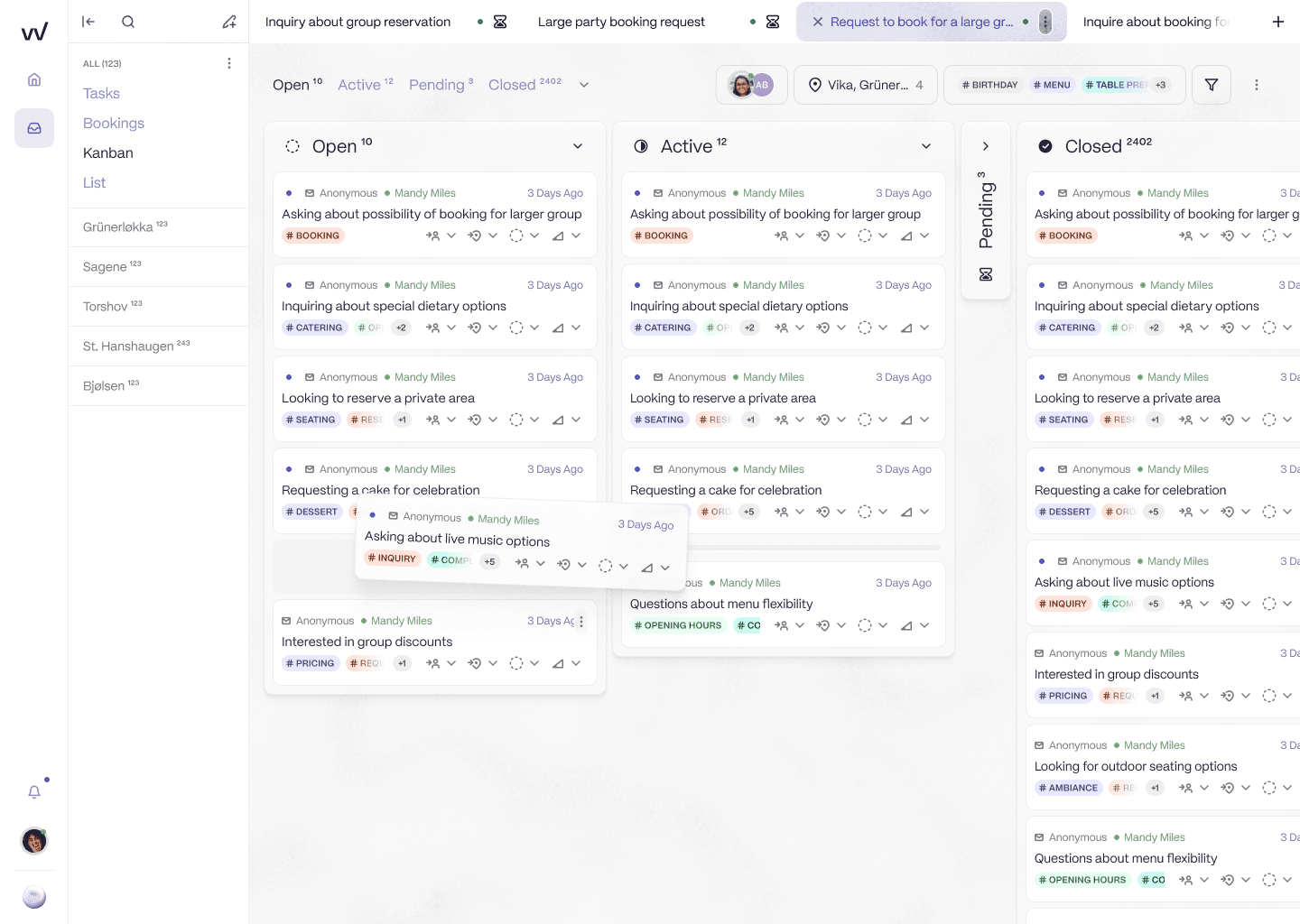
Every enquiry is scored on arrival, so the high-value ones surface at the top of the queue automatically instead of waiting behind routine volume.
It also does the thing a flag cannot: it can send an immediate, branded acknowledgement to the high-value guest the moment they write, so they stay warm overnight instead of moving to the next venue, and then hold the enquiry for the right person to nurture in the morning.
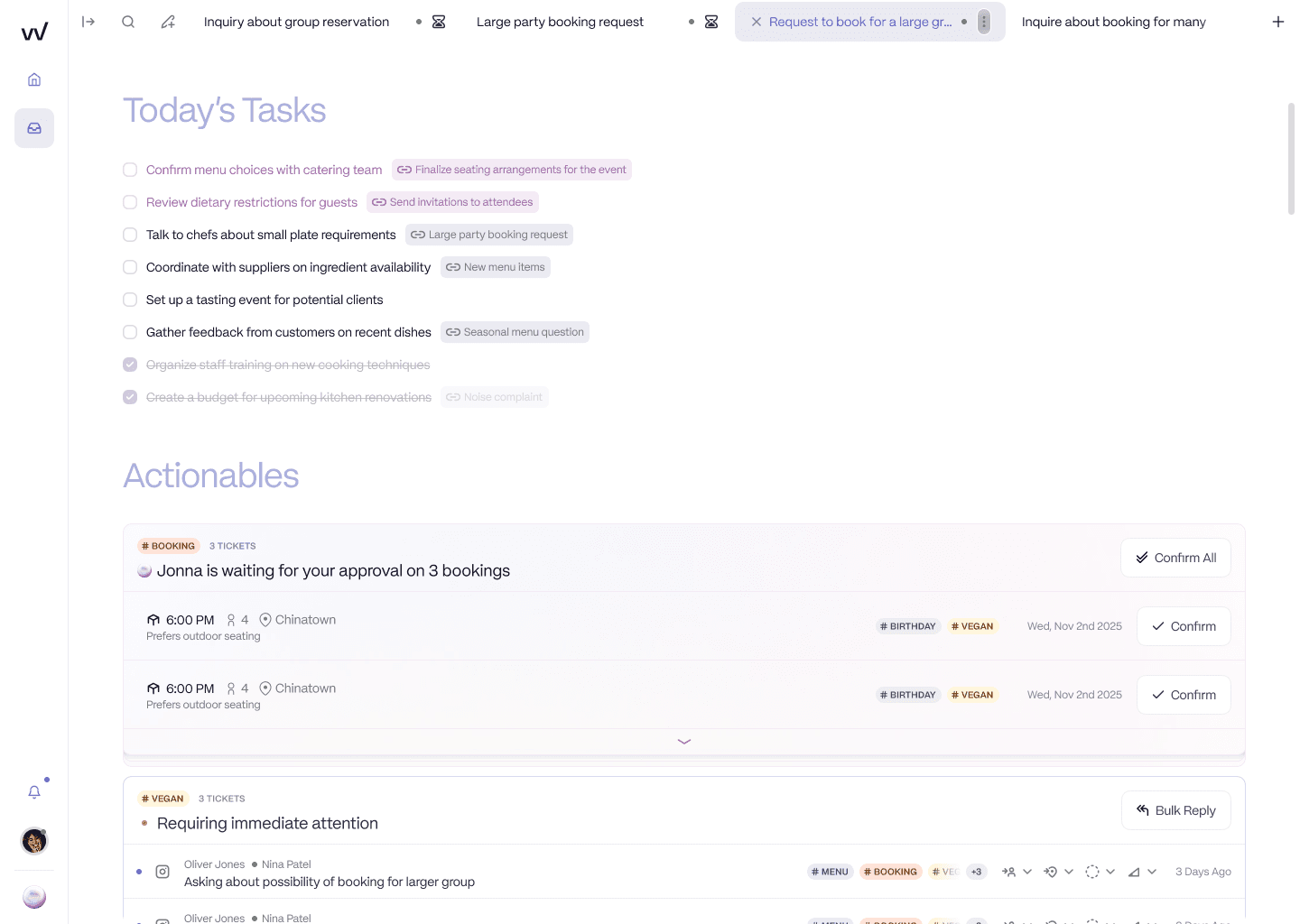
The high-value enquiries the AI holds for a human, acknowledged and prepared, so a venue hire is waiting in a queue the team actually works rather than buried in the inbox.
Underneath, the routine enquiries, the small amendments and the opening-hours questions, get handled automatically, so they stop crowding the priority view at all. And because every enquiry is scored and tracked by location, the triage failures that used to vanish finally show up as data you can manage. The scoring is a dial, not a switch: a group can set the AI to handle enquiries up to about eight covers and route everything larger to the team.
This is the path the Brasilia Group took, moving its booking workload off a horizontal helpdesk onto a location-aware inbox that triages by value. Their founder, Nikolaos Kiosses, put the outcome simply: "The transition from Zendesk to RevVue has been a game changer."
Better manual triage is worth doing, and you can start this week. Knowing that it has a ceiling, and that the ceiling sits right where your biggest bookings live, is what tells you when to automate it. If you want to see how automated triage would have scored a real enquiry your team received last week, book 20 minutes.
Frequently asked questions
How do restaurant groups prioritise high-value group booking enquiries?
They triage by defined signals rather than answering in arrival order. First they agree what counts as high value: party size above a threshold, occasion, venue hire, corporate or third-party sender, repeat or VIP guest. Then they build a priority view in the inbox, using flags and categories in Outlook or labels and filters in Gmail, with rules that auto-flag the obvious signals, and run a sweep routine with a named owner for the high-value queue. At higher volume and out of hours, manual triage breaks, so groups move to automated triage that scores every enquiry on arrival.
What makes a booking enquiry high value?
Value is covers multiplied by spend multiplied by the cost of losing it, not party size alone. The signals to watch are a party above a set threshold (often around eight covers), an occasion such as Christmas or a corporate event, a venue hire or exclusive-use request, a corporate or agency sender domain, a third-party platform source, and a repeat or VIP guest. A 200-cover venue hire and a 12-cover tasting-menu booking can both be high value.
How do you stop large group bookings getting missed in a busy inbox?
Give high-value enquiries a priority view of their own, auto-flag the obvious signals with a rule so they do not depend on someone spotting them, sweep the untriaged mail at the start and middle of each shift, and give the high-value queue a named owner. This holds at low volume. Past roughly 100 emails a day and outside working hours it stops being reliable, which is when automated triage that scores every enquiry on arrival becomes the dependable answer.
Can you automatically flag high-value bookings in Gmail or Outlook?
Partly. In Gmail you can set a filter that applies a label, and in Outlook a rule that applies a colour category, to flag the predictable signals such as third-party platform senders and corporate domains. What neither can do is read the body of a free-text enquiry and judge party size, occasion, or intent, so the judgment-based flagging still falls to a person. Purpose-built tools score the enquiry content itself.
What is inbox triage for restaurant bookings?
Inbox triage is sorting incoming booking enquiries by value and urgency so the team works the most important ones first, rather than answering in the order they arrived. For a restaurant group it means making sure a venue hire or a large group booking surfaces above routine questions like opening hours or a small table change.
How do restaurant groups triage booking enquiries that arrive out of hours?
Manually, they cannot, which is the core problem: the highest-value enquiries tend to arrive in the evenings and at weekends when no one is sweeping the inbox, so a flag set the next working morning is often too late and the guest has booked elsewhere. Automated triage handles this by scoring and acknowledging high-value enquiries the moment they arrive, around the clock, and holding them for the team to nurture.