Zendesk is a capable customer-service helpdesk. For post-booking tickets (voucher redemptions, fake payments, complaints requiring finance escalation) it works fine, and RevVue does not displace it for that work. What Zendesk was never built for is the booking-enquiry inbox: the daily flow of "I'd like a table for 30 on Saturday", "do you have a vegetarian menu", "can I move my booking from 7pm to 8pm". For that workload, Zendesk has a structural problem no amount of configuration fixes. It does not integrate with your booking system. It has no concept of a location. And its AI can write a reply but cannot actually book the table.
This is why most restaurant groups with Zendesk for customer service still run their booking enquiries through a shared Outlook or Gmail. Zendesk just is not the right tool for that side of the operation.
RevVue is built the other way around: for the booking-enquiry workload specifically. Location is the foundational unit, not an add-on. The AI talks to your booking system inside the conversation thread (checks availability, creates the booking, adds notes about dietary or seating preference, handles amendments). Each venue gets its own knowledge base and brand tone. Pricing is per location, not per agent, so adding a restaurant does not mean adding a seat.
This page is the side-by-side comparison: where the two products coexist, where they do not, the architectural argument, the pricing math, what migration actually looks like, and what the Brasilia Group did when they switched.
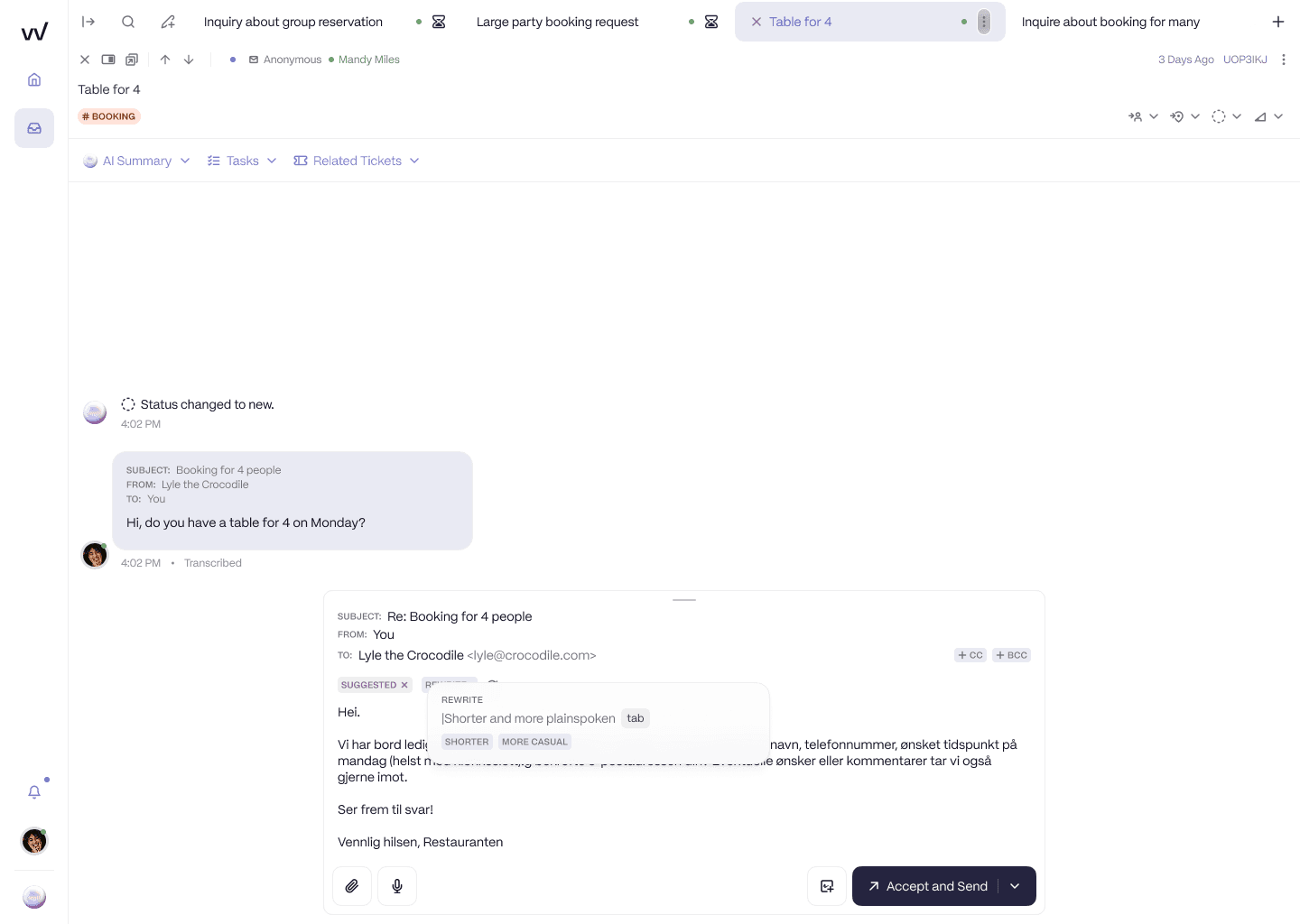
RevVue drafts the reply in your venue's brand tone, in the same thread as the guest enquiry. The team can send, edit, or rewrite with one click.
At a glance
RevVue | Zendesk | |
|---|---|---|
Built for | Multi-location restaurant booking enquiries | Customer-service ticket teams |
Booking system integration (SevenRooms, OpenTable, Collins) | Yes, AI talks to the booking system inside the thread | None |
Location model | Native: every message pinned to a site | Custom field plus trigger rule to maintain |
AI behaviour | Replies, creates bookings, updates bookings, handles amendments | Writes replies only |
AI training | Hospitality context, brand tone learned from your historical emails | Generic support tickets |
Per-venue knowledge base and brand tone | Yes, per venue | Single tone across all venues |
Pricing model | Per location per month (£75) | Per agent per month (£55 to £115) |
Per-venue access for site GMs | Built in, no extra seats | Per-seat, forces groups to limit GM access |
Reviews and surveys | Included (Google, TripAdvisor, NPS) | Not available |
Implementation time | Days | Weeks to months |
Out-of-the-box reporting | Site-level response rate, booking conversion, complaint volume | Per-agent ticket throughput |
Two distinct workloads. Two different tools.
Most multi-location restaurant groups have two separate inbound flows, and they look almost nothing alike.
Customer-service tickets are structured, escalation-driven, and post-visit. A voucher does not redeem. A guest's card was charged twice. A complaint needs finance to look at it. A staff member behaved badly. These tickets need an audit trail, an SLA, an escalation path, often a workflow that touches more than one team. Zendesk is built for this work. Freshdesk is built for this work. RevVue is not, and does not try to be.
Booking enquiries are conversational, transactional, and pre-visit. A guest wants a table for thirty on Saturday. They want vegetarian options confirmed. They want to move their booking from 7pm to 8pm. They want to add a dietary note. To handle one of these properly, the tool needs to talk to your booking system: check availability, create the booking, update it, attach notes. A reply on its own is not the job. The job is the reply plus the booking action.
Zendesk and Freshdesk cannot do the booking action because they have no booking system integration. This is why even groups running Zendesk for customer service typically still run their booking enquiries through a shared Outlook or Gmail. The customer-service helpdesk is not the right tool for booking enquiries, so it stays in its lane and the Outlook inbox stays in another lane.
RevVue replaces the Outlook lane. Not the Zendesk lane.
If you are currently using Zendesk and most of your tickets are customer-service work, you probably should not move that to RevVue. Keep Zendesk for what it is good at. What you should look at is the booking-enquiry inbox that sits separately, on Outlook or Gmail, and ask whether it is still acceptable that nobody can tell you the response rate, that nobody can route a thirty-person enquiry above the noise, and that no one can answer a guest at 9pm on a Friday without a human picking up the message manually.
Why Zendesk does not fit a multi-location restaurant group's booking enquiries
It does not talk to your booking system
The single most important integration for a booking-enquiry inbox is the booking system itself: SevenRooms, OpenTable, Collins, Design My Night, ResDiary, or whatever else your group runs on. Zendesk does not integrate with any of these. Not in a custom app. Not in the marketplace. There is no Zendesk plugin that lets a Zendesk ticket reach into SevenRooms and check availability.
This means every booking enquiry that comes into Zendesk requires a human to:
Read the enquiry.
Open the booking system in another tab.
Check availability.
Reply to the guest in Zendesk.
Go back to the booking system and create the booking.
Add any notes (vegetarian, dietary, occasion).
Each of those steps is manual. Each is a place the workflow stalls. Each is why even Zendesk customers run booking enquiries through Outlook or Gmail instead: at least the email is in one place and the templates are already built. The Zendesk ticket layer adds friction without adding any of the workflow the team actually needs.
RevVue handles the entire flow inside the conversation thread. The AI reads the enquiry, checks availability in your booking system, creates the booking, adds notes, replies to the guest, and surfaces the thread for human review only when the rules say it should (typically for bookings above a configurable size threshold). The team sees the messages that actually need them. The booking system stays in sync without anyone double-entering anything.
It does not know which restaurant a guest wrote to
Every inbound message in Zendesk lands in a generic ticket queue. Site 7 looks identical to Site 2. Site 14 is not a real entity inside the platform: it is a tag someone added, on a custom field someone created, populated by a trigger someone wrote. One configuration change and the whole arrangement breaks.
A Cote Brasserie operations lead described the same problem from the reporting side. They could see total complaint volume across the estate. They could not break it down by site. "I can say we've had a lot of complaints about steaks. But they say: which brasseries? How many complaints out of how much? And I'm like: I can't get that detail." When the data layer does not know what a location is, the report cannot answer the question that matters.
It prices a 240-restaurant operation the same way it prices a 240-person support team
Restaurant groups run lean central teams. The Big Table Group runs 240 restaurants in the UK with 3 booking staff, down from 15 before COVID. A typical RevVue prospect manages 20 to 50 sites with a team of 2 to 4. That is a feature of how the sector is staffed, not a sign of under-investment.
Zendesk charges per agent. Whether you have 3 sites or 30, you pay roughly the same: £55 to £115 per agent per month. The cost stays nearly flat as your locations grow. So does the depth of insight Zendesk gives you about each site, which is zero.
RevVue charges per location. As your estate grows, your cost grows in proportion to what RevVue is actually managing for you.
The AI was trained on software-support tickets
Zendesk Copilot is built on the corpus of complaints, refund requests, password resets, and bug reports that flow through software-company helpdesks. That is a sensible training set for software. It is the wrong training set for hospitality.
A guest asking about dietary options for a party of 30 is not a support ticket. A "can I bring my dog" enquiry is not a support ticket. A complaint about a £40,000 event booking is not a support ticket either. They are guest interactions that follow different patterns, use different vocabulary, and require different judgement about when to escalate and when to reply.
Generic AI gives generic replies. In hospitality, a generic reply costs the booking.
This is not a configuration gap
Restaurant groups who switch from Zendesk to RevVue do not switch because Zendesk is missing a feature. They switch because location-awareness is not a feature you can bolt on: it is an architectural decision made before the first line of code is written.
Zendesk treats a message as a message. RevVue treats a message as a message from a guest at a specific location, on a specific date, with a booking history, with a response time clock already running, and with the local manager who needs to see it identified before the message reaches the inbox.
That single architectural difference determines everything downstream: how routing works, how reporting works, how the AI replies, how much configuration your team has to maintain forever. You can add a "location" custom field to Zendesk in an afternoon. You cannot retrofit a data model.
Location-aware from the start, not from a custom field
In Zendesk, location is something you add. You create a custom field. You build a trigger that says: if the email came from this address, tag it with this location. You train your team to set the tag manually on the messages that did not match the trigger. You chase the team when they forget.
In RevVue, location is something it already knows. Every inbound message is matched to the right restaurant automatically based on the recipient address, the venue identifier in the message body, and the guest's booking record where one exists. No tags. No triggers. No weekly maintenance.
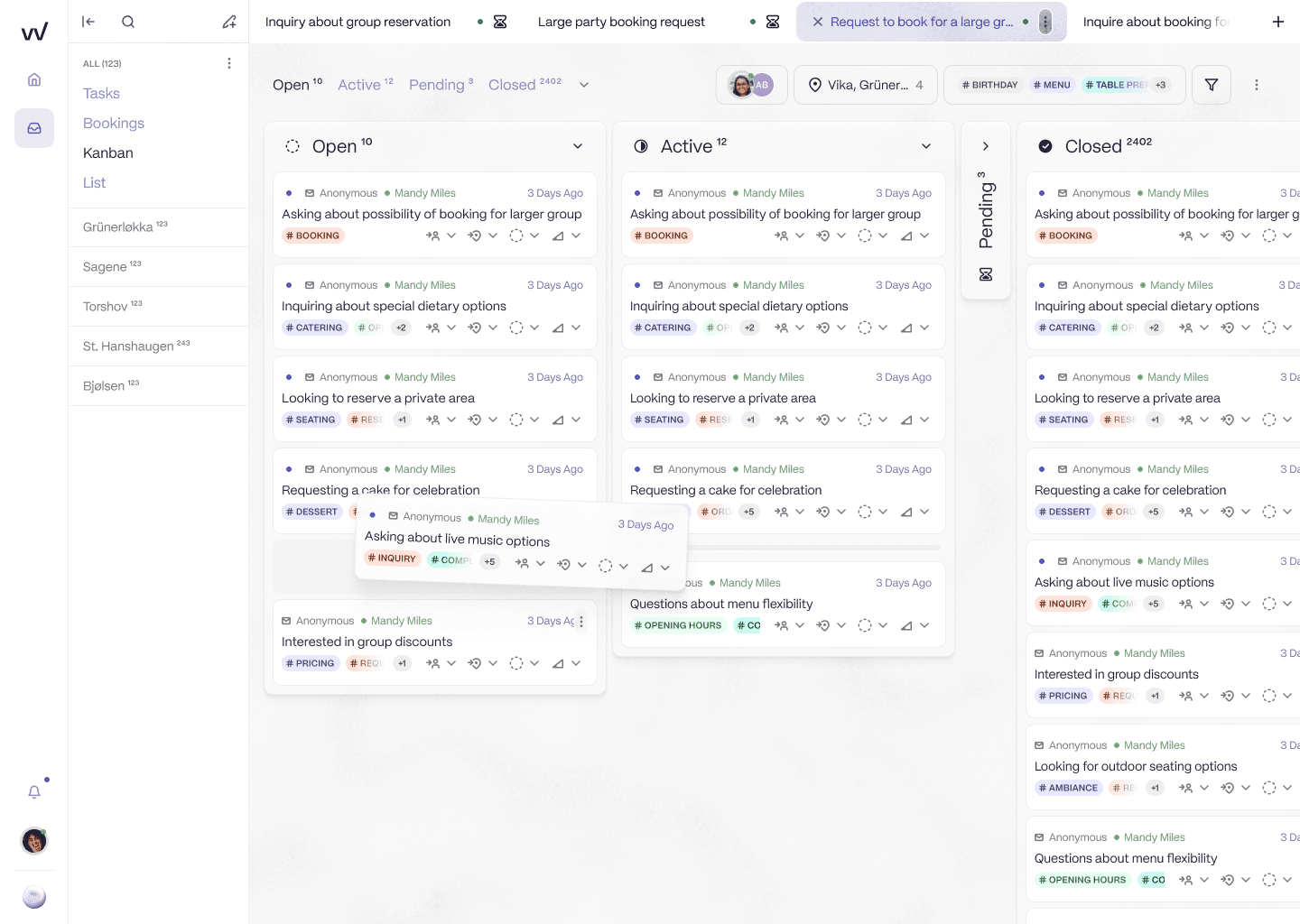
Sidebar lists every venue in the group. Tickets are pinned to the right restaurant and tagged with rich metadata for triage and reporting. No custom fields or trigger rules required.
What this means in practice:
When leadership asks which sites are slowest to respond this week, you have the answer in the dashboard.
When a complaint comes in about a specific location, it routes to the right person without anyone touching it.
When you open a new restaurant, it appears in the platform the day you add it.
When you offboard a site, all of its history stays attached to the right place.
This is what it looks like when location is the foundational data model rather than something layered on top.
Pricing that fits how restaurant groups are actually staffed
Restaurant groups run with small central teams. Three people managing 240 restaurants. Two people managing 50 sites. One Head of Reservations with two assistants covering the whole estate. That is the sector reality, and any tool that ignores it is going to feel expensive.
Zendesk prices per agent. RevVue prices per location. The maths plays out very differently as a restaurant group grows.
Group profile | RevVue cost | Zendesk list cost | Hidden Zendesk cost |
|---|---|---|---|
20 sites, 3-person team | £1,500/month | £165–£345/month | Initial config (Zendesk consultant) plus ongoing maintenance of custom fields and triggers |
50 sites, 4-person team | £3,750/month | £220–£460/month | Same configuration cost, scaled up for more locations |
Add a new location | +£75/month | £0 | Manual setup of routing rules, distribution lists, and reporting per site |
The Zendesk per-agent number looks lower at the headline. Add the configuration cost (Zendesk implementation partners typically charge £8,000 to £20,000 for a multi-location helpdesk build), add the consultant time to maintain that configuration as your estate changes, add the team time spent doing manual location tagging on messages that the triggers missed, and the gap closes quickly.
A few groups we have spoken to do their own Zendesk configuration in-house. They tend to discover that the person who built it leaves, and the next person inherits a stack of triggers nobody fully understands. The cheapest day for that configuration is the day it was built.
AI that books the table, not just AI that writes the reply
This is the single biggest functional difference between RevVue and any horizontal helpdesk including Zendesk. Zendesk Copilot can suggest a reply to a guest enquiry. It cannot do anything in your booking system. So even when it suggests a great reply, a human still has to:
Open the booking system.
Check availability for the requested date and time.
Create the booking.
Add notes for any dietary or seating preferences.
Confirm everything back to the guest.
The "AI suggested a reply" save is real, but it is a small slice of the work. Most of the manual steps remain.
RevVue's AI runs the whole flow inside the same conversation thread. A guest emails asking for a table for four on Saturday at 7pm, vegetarian, quiet area. The AI reads the enquiry, checks availability in the booking system, creates the booking, attaches the vegetarian and quiet-area notes, replies to the guest confirming the table with a menu recommendation, and tags the message with rich metadata for analytics. Total elapsed time: seconds. Team intervention needed: none.
When the guest comes back later to say they are now three not four, the AI updates the booking and confirms the amendment back. Again, no team intervention. Booking system stays in sync.
For bookings above a threshold the group sets (often around eight people), the AI either drafts a first response from a venue-specific template and asks for any missing fields, or routes the enquiry to the human team entirely, depending on the rules. The team sees the bookings that actually warrant their judgement: large groups, complaints, venue hires, VIP requests. They do not see the 15 to 35 percent of inbound volume that is routine.
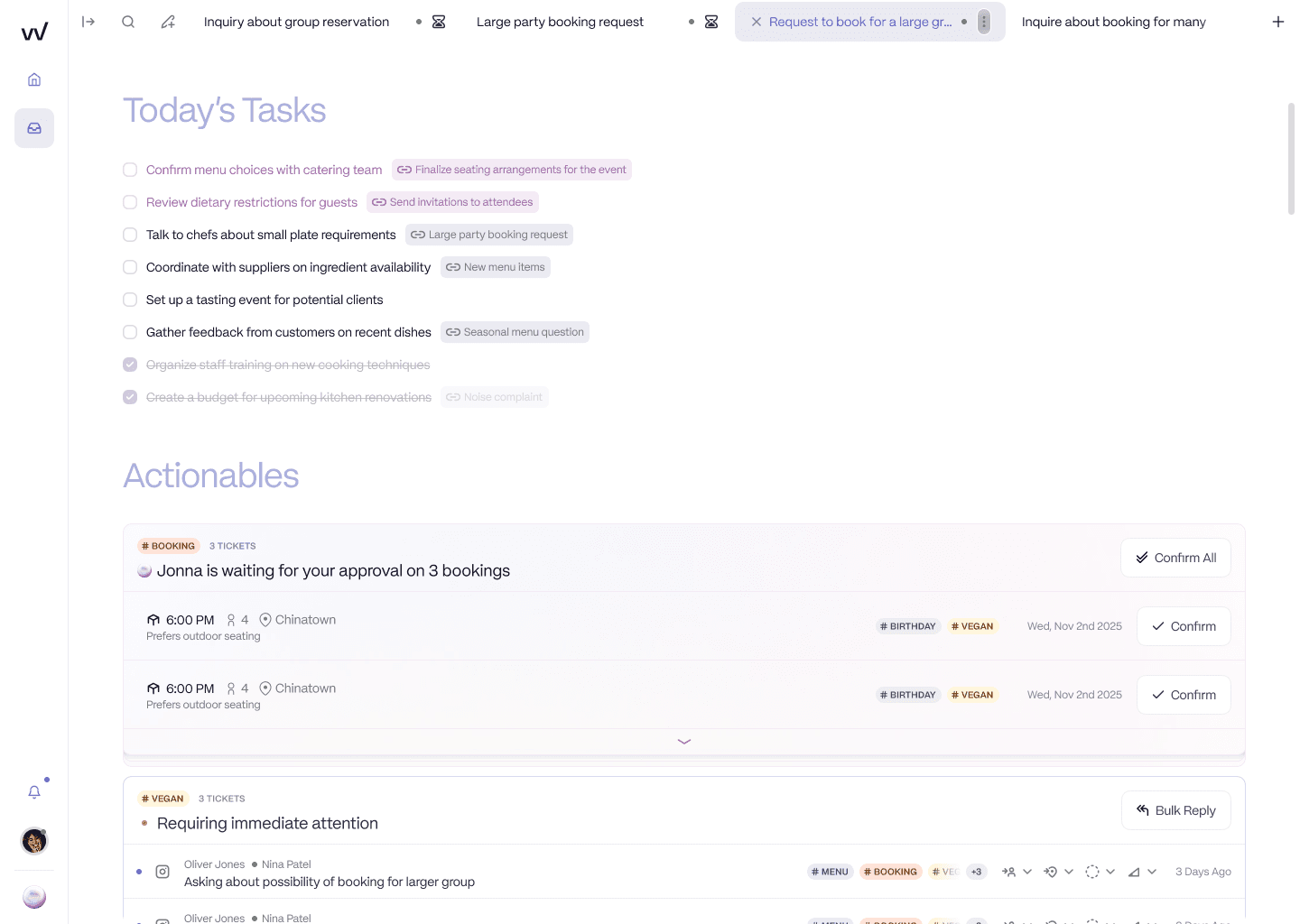
The AI handles the routine. The team sees only the bookings that need their judgement, queued for one-click approval with the booking details already extracted.
Brand tone that sounds like your venue, not like a chatbot
The AI is trained specifically on hospitality context. It understands booking language ("a six-top for Saturday evening", "we're looking at the private dining room", "any chance of squeezing us in earlier"), dietary terminology, and how to ask for the right information from a guest without sounding like a chatbot. Brand tone is learned automatically from your team's historical Outlook or Gmail replies (the integration reads existing emails, picks up the tone, applies it on day one). Each venue can have its own tone, so a fine-dining wine bar and a casual high-street pizza brand under the same group sound right for each.
Zendesk's AI has no equivalent of this. It is one configuration for the whole organisation. A 30-concept restaurant group running on Zendesk gets one tone across all 30 brands, or has to maintain 30 separate Zendesk configurations.
The honest state of the product
To be specific about where the AI agent is today: it is live in production across more than 60 locations in Norway. UK pilots are running. It is not yet fully GA in the UK. The support inbox itself (location-aware routing, super tags, workspaces, templates, internal notes, access control) has been live for over a year. The AI agent is something you would pilot, not something you would assume is mature on day one.
Not just the inbox: the full guest relationship by location
Zendesk does support. RevVue does support, online reviews, and post-visit surveys in one place, organised by location. For a multi-location restaurant group, this is less about cross-selling modules and more about giving the team one view of a guest who emailed a complaint last week, left a 2-star review on Google three days ago, and rated their visit a 4 on the post-visit survey before they left the venue.
In Zendesk those are three separate things. In RevVue they are one record, attached to the right site.
If you only need the inbox today, you can buy only the inbox. The modules are sold separately.
Side-by-side comparison
RevVue | Zendesk | |
|---|---|---|
Built for | Multi-location restaurant booking enquiries | Customer-service ticket teams |
Booking system integration | ||
Talks to SevenRooms, OpenTable, Collins, Design My Night, ResDiary | Yes (select systems live, SevenRooms in active development) | Not available, no marketplace app exists |
AI checks availability inside the conversation thread | Yes | No, requires human action |
AI creates bookings inside the conversation thread | Yes | No, requires human action |
AI updates booking notes (dietary, seating, occasion) | Yes | No, requires human action |
AI handles booking amendments ("we're three not four") | Yes, chat-style in the same thread | No |
Core inbox | ||
Location assigned to every message automatically | Yes | Custom field plus trigger required |
Location-level reporting out of the box | Yes | Per-agent reporting only |
Route messages by site automatically | Yes | Requires configuration |
Super tags with rich metadata for triage and analytics | Yes, customisable in natural language | Manual tagging only |
Workspaces (filter views per restaurant or category) | Yes | Custom views, configuration required |
Per-venue templates | Yes, users see only their venue's templates | Single template library |
Internal notes with @mentions | Yes | Yes |
Collision detection (two team members replying) | Yes | Yes |
SLA tracking | Yes, per location | Yes, per agent |
AI | ||
AI trained on hospitality context | Yes | Generic (Zendesk Copilot) |
Brand tone learned automatically from historical emails | Yes | Manual configuration |
Per-venue brand tone for multi-concept groups | Yes | Single configuration only |
AI handles routine enquiries autonomously | In pilot, ≥60 live locations in Norway, UK pilots running | Add-on product, additional cost |
Knowledge and channels | ||
Per-venue knowledge base / wiki | Yes (in active development) | Single global knowledge base only |
Daily website crawl for menu updates | Yes | Not available |
Per-venue branded web chat feeding one inbox | Launching June 2026 | Not available at the per-venue level |
WhatsApp integration | Launching June 2026 | Available |
Access control | ||
Per-manager, per-venue inbox access (no seat penalty) | Yes, built in | Per-seat pricing; groups limit seats and block GMs |
Reviews and surveys | ||
Google review management | Yes | Not available |
TripAdvisor review management | Yes | Not available |
Post-visit surveys with NPS scoring | Yes | Not available |
Location-level review analytics | Yes | Not available |
Pricing and implementation | ||
Pricing model | Per location per month (£75) | Per agent per month (£55 to £115) |
Implementation time | Days | Weeks to months |
Built for restaurant groups | Yes | No |
Switching takes days, not months
The thing most teams quietly worry about with any platform migration is losing the configuration they spent months building. With Zendesk that usually means: templates the team has refined over time, trigger rules for routing by location, custom fields that took a consultant a fortnight to set up, and a reporting view someone in IT built and nobody else fully understands.
The migration to RevVue is short because most of that configuration is not something you have to recreate. It was compensating for what Zendesk could not do natively, and RevVue does those things natively.
Here is the actual sequence.
Before launch (2 to 3 working days). You send us a list of your locations and the email address each one uses to receive guest enquiries. Our team sets up RevVue with your locations and configures the AI to your brand voice using 20 to 30 examples of replies your team has sent (you provide these from your existing inbox). Your IT team sets up email forwarding from your current addresses to RevVue. This is the one technical step on your side and it is the same forwarding setup any IT team has done for other tools.
Day 1 live. Inbound messages start arriving in RevVue, already tagged to the correct location automatically. Your team opens the inbox, sees the same kind of messages they saw yesterday in Zendesk, and replies. The AI suggests draft replies on the routine enquiries (dietary questions, opening hours, dog policies). The team accepts, edits, or rewrites the drafts the same way they would review any human draft.
Week 1. The team learns the keyboard shortcuts. The AI improves as it sees more of how your team replies. Filtering by location becomes muscle memory. Most groups keep the Zendesk inbox open in another tab as a safety net for a few days, then stop opening it.
Week 2. The location-level dashboard becomes what leadership opens in the morning. For most groups this is the first time anyone has seen response rates broken down by site. Management conversations change because the data is finally there.
What you do not need to do during migration:
You do not rebuild custom fields. Location, site, brand, and venue are part of the data model already.
You do not recreate trigger rules for routing. Routing by location is automatic.
You do not train the team on a new ticketing concept. They are still working from an inbox.
You do not write new SLAs from scratch. Existing SLAs translate to RevVue's per-location SLA model.
If a specific Zendesk configuration is important to you (a Salesforce integration, a particular SLA tier, an automation you depend on), tell us before you start. We will tell you honestly whether RevVue handles it today, has it on the roadmap, or does not.
What the Brasilia Group did
The Brasilia Group is a UK restaurant group that displaced Zendesk with RevVue. Their founder, Nikolaos Kiosses, described the outcome as: "The transition from Zendesk to RevVue has been a game changer."
The specifics of why they switched are the same specifics most restaurant groups arrive at. Zendesk was technically working. Tickets were being created. Replies were going out. But the central team had no view of which locations were performing well, no way to route messages by site without manual configuration, and no AI that understood the difference between a dietary question and a £4,000 venue hire enquiry.
If you would like to speak to Brasilia directly before deciding, we can arrange it. We do not put our customers on referral calls unless we are confident the conversation will be useful to both sides.
What RevVue does that Zendesk does not
Automatic per-site routing without trigger maintenance
Per-location reporting out of the box
AI trained on hospitality context, configured to brand voice
Online review aggregation and AI-drafted responses
Post-visit survey collection and analysis
Pricing that scales with location count, not team size
Implementation in days rather than weeks
Questions Zendesk customers ask us
We already use Zendesk for customer service. Should we move that to RevVue?
No, probably not. RevVue is not a customer-service helpdesk. If your Zendesk tickets are voucher redemptions, post-visit complaints, finance escalations, and similar work, Zendesk handles that well and we are not asking you to switch it. What we are asking is what happens with your booking enquiries, which on almost every restaurant group's setup sit separately, in a shared Outlook or Gmail. That is the inbox we replace. The two tools coexist.
Why do most restaurant groups still use Outlook for booking enquiries even when they have Zendesk?
Because Zendesk does not integrate with their booking system. A booking enquiry is not just an email to reply to. It is a transaction that needs availability checked, a booking created in SevenRooms or OpenTable or Collins, and notes attached (dietary, occasion, seating). Zendesk has no way to do any of those things. So the booking-enquiry team uses Outlook (where at least their templates are set up and the team knows the workflow) and Zendesk stays focused on customer-service tickets.
Is RevVue cheaper than Zendesk overall?
For a typical restaurant group of 20 to 50 locations with a 2 to 4 person central team, yes. RevVue is £75 per location per month with no per-agent cost. Zendesk's list price is £55 to £115 per agent per month, plus the configuration cost (initial build and ongoing maintenance of custom fields, triggers, and reports). The hidden Zendesk cost most groups discover late: per-seat pricing forces them to limit seats and block site GMs from seeing their own venue's inbox. RevVue's per-venue access is built in with no per-seat penalty.
Does Zendesk's AI book the table?
No. Zendesk Copilot can suggest a reply. It cannot check availability in your booking system, create a booking, or update one. Any AI suggestion still needs a human to do the booking action in the booking system separately. RevVue's AI does the reply and the booking action together inside the same conversation thread.
Can RevVue do everything Zendesk does for booking enquiries?
Yes, and several things Zendesk cannot do: talk to the booking system, run location-aware routing without configuration, learn brand tone from historical emails, give each venue its own knowledge base, and price per location instead of per agent. For customer-service tickets, RevVue does not try to replace Zendesk.
What about the integrations we already have configured in Zendesk?
If those integrations support your customer-service workflow (Salesforce, JIRA, finance tools), keep them, keep Zendesk, and use RevVue for booking enquiries. If the integrations you wish Zendesk had are booking systems, you cannot get them in Zendesk: there are no SevenRooms, OpenTable, or Collins apps in the Zendesk marketplace. RevVue is building those integrations and several are live for select booking systems today.
How long does migration take?
Most groups are live within a week. Email forwarding is a one-time setup. The team needs a 60-minute training session. Locations are configured from a list you already have. There is no data migration required: RevVue starts fresh rather than importing years of historical Zendesk tickets, which removes one of the biggest sources of migration failure.
What if our team resists the change?
The interface is familiar. It looks like an inbox: message threads, reply box, assignment. What changes is what happens automatically (location tag, AI draft, routing) rather than what the team has to do. The team does fewer things, not different things. In our experience, the resistance disappears in the first week, when the team stops manually tagging every message and notices.
Can we run RevVue alongside Zendesk before committing?
Yes. We offer a pilot on a subset of locations (usually email-only while any booking system integrations are in progress). You get real data on response time and AI quality before you make a decision. We do not require a full commitment to start.
Does RevVue handle complaints differently from routine enquiries?
Yes, and this is one of the main reasons restaurant groups switch from Zendesk. A complaint about a specific location routes to the right manager automatically. A routine dietary question is handled by the AI. A large group booking goes to the central team. In Zendesk, all three look identical until someone manually triages them. In RevVue, they are differentiated before they reach a human.
What about reporting on response rates and booking conversion?
This is the area where restaurant groups feel the biggest difference. Zendesk reports on ticket volume and agent throughput. RevVue reports on response time by location, booking conversion by enquiry type, complaint volume by site, and team performance by venue. Most groups have never had this view of their inbox before. The reporting is often what makes the switch obvious internally: when you can see for the first time that one site replies in two hours and another takes two days, the case for change writes itself.
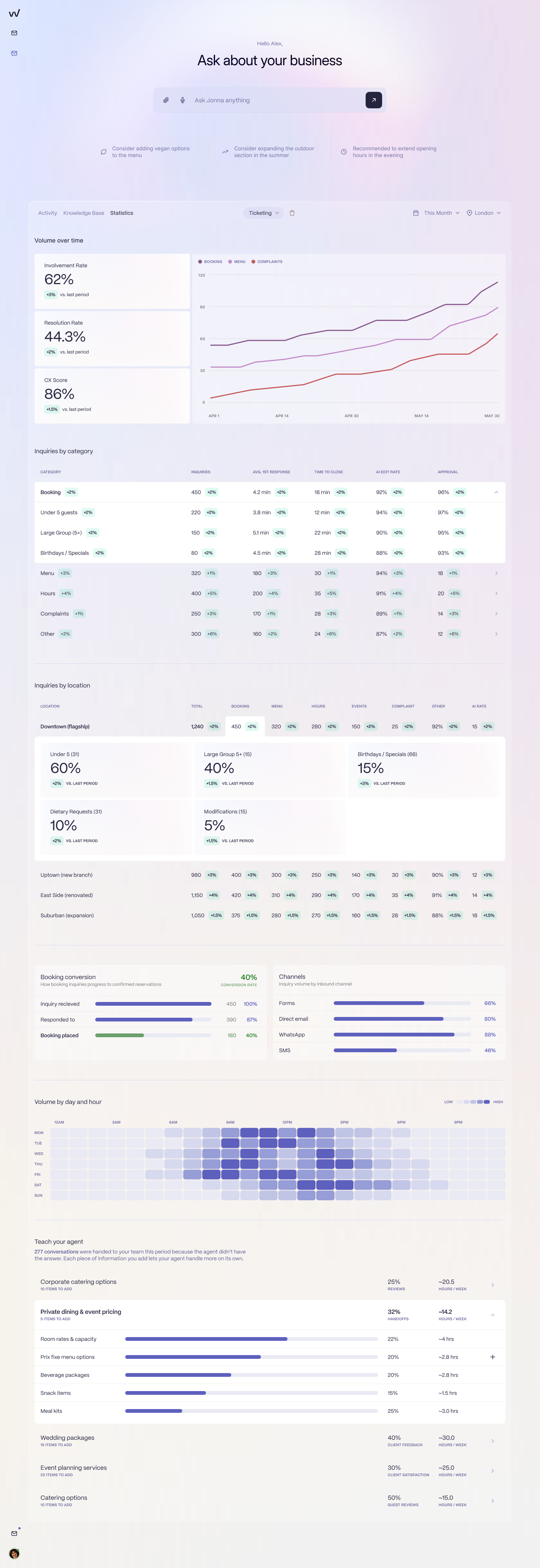
The inbox finally has a data layer. Response rate, resolution rate, booking conversion, channel mix, all by venue. None of this exists in a shared Outlook inbox. None of it exists in Zendesk without weeks of custom report configuration.
See it on a real enquiry from your inbox
We will run a 20-minute session. You bring an enquiry from your inbox: a group booking, a complaint, a dietary question. We show you what RevVue would have done with it. No slides. No pitch deck.